
Cash Flow Frog Review

What is Cash Flow Frog?
Cash Flow Frog: A Powerful Tool for Managing Your Finances
Managing your cash flow is critical to the success of any business. It helps you track your income and expenses, forecast your future financial situation, and make informed business decisions. However, with so many financial transactions happening each day, it can be overwhelming to keep track of everything manually.
That's where Cash Flow Frog comes in. This robust software is an essential tool for businesses in managing their finances. With its user-friendly interface and comprehensive features, this app simplifies the process of budgeting, forecasting, and analyzing your cash flow. Let's dive into my experience testing this software.
Key Features
- Automated Data Import: Cash Flow Frog allows you to connect your bank accounts, credit cards, and other financial platforms to automatically import your transaction data. This eliminates the need for manual data entry and saves you valuable time.
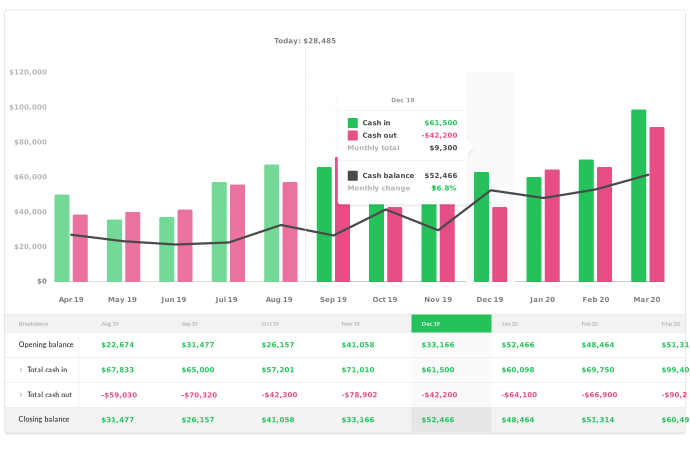
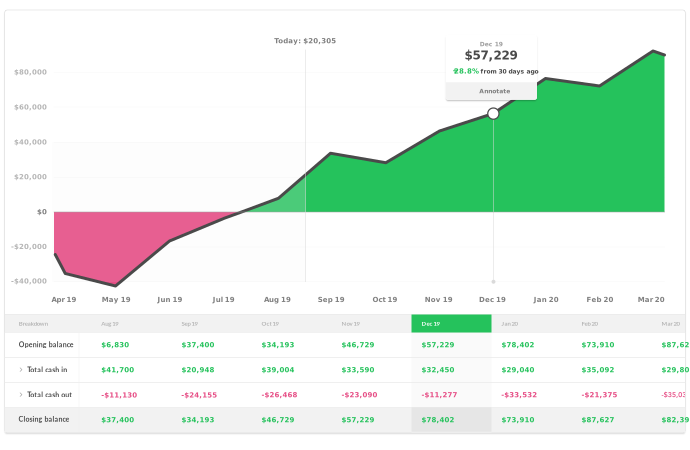
- Dashboard Overview: The dashboard provides a clear and concise overview of your cash flow, giving you instant insights into your income, expenses, and net cash position. The visual representations, such as graphs and charts, make it easy to understand your financial situation at a glance.
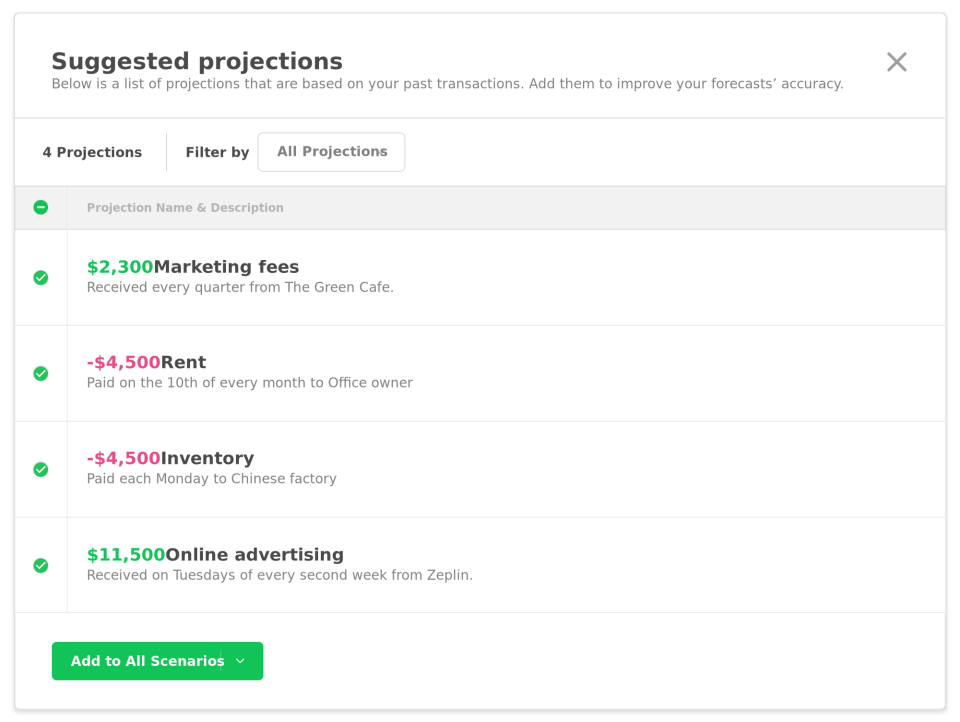
- Budgeting and Forecasting: This app offers robust budgeting and forecasting tools that help you set financial goals and plan for the future. You can create budgets, track your actual spending against your budgeted amounts, and make adjustments as necessary. The forecasting feature allows you to project your financial position based on your historical data, empowering you to make proactive decisions.
- Expense Categorization: Cash Flow Frog automatically categorizes your expenses based on your transaction history. However, you have the flexibility to customize and create your own categories to fit your business needs. This feature helps you better understand your spending patterns and identify areas where you can cut costs.
- Financial Reporting: Generate comprehensive financial reports, such as profit and loss statements, balance sheets, and cash flow statements, with just a few clicks. These reports provide valuable insights into your business's financial health and help you make data-driven decisions.
- Collaboration and Sharing: Cash Flow Frog allows you to collaborate with your team members, accountants, or financial advisors by granting them access to specific features or reports. This promotes transparency and streamlines your financial management process.
User Testimonials
"Cash Flow Frog has revolutionized our financial management. It has saved us countless hours of manual data entry and provided us with accurate and timely insights into our cash flow. Highly recommended!" - John Doe, CEO of XYZ Company
"As a small business owner, Cash Flow Frog has made it incredibly easy for me to track my expenses and stay on top of my budget. I can't imagine managing my finances without it!" - Jane Smith, Owner of ABC Boutique
Frequently Asked Questions (FAQ)
-
Can I connect multiple bank accounts to Cash Flow Frog?
Yes, Cash Flow Frog allows you to connect multiple bank accounts, credit cards, and other financial platforms to import your transaction data.
-
Is it possible to customize expense categories?
Absolutely! Cash Flow Frog provides the flexibility to customize expense categories to fit your business's specific needs.
-
Can I collaborate with my team members or financial advisors?
Yes, you can easily collaborate with your team members, accountants, or financial advisors by granting them access to specific features or reports within Cash Flow Frog.
Overview of Cash Flow Frog
Overview of Cash Flow Frog Features
- Balance Forecasting
- Customer Insights
- Account Overview
- Cash Flow Breakdown
- Account Mapping
- In-app Support
- QuickBooks and Xero Integration
- Cash Management
Gallery
Videos
Popular Cash Flow Frog Alternatives







Report a problem Claim this Profile
Add New Comment